







Troubleshooting Common Combo Boxer Hardware Issues
- Troubleshooting Common Combo Boxer Hardware Issues
- Understanding Your Combo Boxer Kick Boxing Game: Key Components of a Boxing Machine Arcade Game
- Power and Startup Problems — Is Your Boxing Machine Arcade Game Failing to Boot?
- Sensor and Calibration Errors — Why Punches or Kicks Don’t Register
- Punching and Kicking Pad Wear — Restore Impact Performance on Your Boxing Machine Arcade Game
- Display, Scoreboard and Software Glitches — Fixing the Face of the Game
- Sound and Speaker Issues — Restoring Audio Feedback
- Payment Systems and Ticket Dispensers — Getting Revenue Flowing Again
- Mechanical and Cabinet Problems — Loose Parts, Vibrations, and Safety Concerns
- Routine Maintenance Schedule for Your Combo Boxer Kick Boxing Game
- When to Repair vs Replace Parts — Cost and Downtime Comparison
- Brand Advantages — Why Buy the Combo Boxer Kick Boxing Game for Your Arcade or Venue
- Tools, Spare Parts, and Best Practices to Keep on Hand
- Safety and Compliance — Protect Players and Technicians
- FAQs — Combo Boxer Kick Boxing Game & Boxing Machine Arcade Game Troubleshooting
- Contact Support / View Product
- Quick Checklist Before You Call Support
- Sources and References

Troubleshooting Common Combo Boxer Hardware Issues
Understanding Your Combo Boxer Kick Boxing Game: Key Components of a Boxing Machine Arcade Game
Before you diagnose problems with the Combo Boxer Kick Boxing Game – Test Your Strength with Fists and Feet!, it's important to know the key hardware elements that commonly cause issues. This hybrid boxing machine arcade game combines electronic sensors (for punches and kicks), a power and control board (power supply, fuse, CPU/logic board), I/O elements (display/scoreboard, speakers), mechanical components (pads, mounting brackets, support frame), and optional payment systems (coin mech, bill validator, or cashless reader). Knowing these systems and how they interact reduces time-to-fix and prevents unnecessary part swaps.
Power and Startup Problems — Is Your Boxing Machine Arcade Game Failing to Boot?
Symptoms: no lights, blank display, no sounds, or intermittent power cycles. These are the most common issues to encounter on arcade units including the Combo Boxer Kick Boxing Game. Begin with a methodical power check: verify the outlet with a known-good device, check the machine's mains cable and plug, confirm the breaker or on-board main switch is on. Next, open the back panel following safety procedures (unplug power first) and inspect the primary fuse(s) on the power entry and the internal power supply board. Replace blown fuses with identical rating fuses only. If fuses blow repeatedly, an internal short or failed power supply may be present and requires trained technician service.
Diagnostics: Use a multimeter to verify incoming mains, and check the DC output rails from the internal power supply (commonly +5V, +12V, ±12V depending on the control electronics). If the supply voltages are present but the CPU doesn't boot, a firmware or logic board fault may be the cause. Many boxing machine arcade game control boards include a test / service mode; consult the product manual for how to enter it to isolate software from hardware issues.
Sensor and Calibration Errors — Why Punches or Kicks Don’t Register
Symptoms: hits register inconsistently, low scores for strong hits, or only one pad registers. The Combo Boxer Kick Boxing Game uses impact sensors (piezoelectric sensors, load cells, or pressure switches) to measure force. Common causes include loose wiring, broken sensor elements, degraded sensor adhesives, or software thresholds that need calibration.
Troubleshooting steps: first, enter the game’s diagnostic mode to view raw sensor readings if available. Check connectors at the sensor and at the main board for corrosion or broken pins; reseat connectors. Inspect sensor mounting: if adhesives or foam layers are worn, the sensor may not experience full impact. For piezo sensors, verify the sensor element continuity with a multimeter; for load cells check for visible bending, cracks, or asymmetry. Recalibrate the sensor thresholds through the service menu to adapt sensitivity to local conditions (temperature, pad hardness). If a single sensor is dead, swap the sensor cables with a known-good channel to confirm whether the issue follows the sensor or the channel on the board.
Punching and Kicking Pad Wear — Restore Impact Performance on Your Boxing Machine Arcade Game
Symptoms: flat feel, reduced rebound, tearing foam, loose outer covers. Impact pads (targets) are wear items on every boxing machine arcade game. The Combo Boxer Kick Boxing Game combines standing kicking pads and upper punching pads; both require different wear attention points. Surface covers (vinyl or polyurethane), inner foam, mounting plates, and bolt connections need periodic inspection.
Maintenance: replace outer covers when stitching fails or vinyl cracks to prevent moisture ingress into sensors. Replace foam cores if they compress and no longer provide cushioning — this affects sensor readings and player experience. Check and tighten all mounting bolts and shock-absorbing elements (springs, dampers). Use manufacturer-specified replacement pads to preserve sensor alignment and game calibration.
Display, Scoreboard and Software Glitches — Fixing the Face of the Game
Symptoms: frozen scoreboard, garbled characters, touchscreen unresponsiveness, or unexpected resets. The scoreboard and user interface are critical for player feedback on the Combo Boxer Kick Boxing Game. A blank or unstable display could indicate loose ribbon cables, faulty LED drivers, or corrupted firmware.
Troubleshooting: power-cycle the machine and observe POST or boot messages in service mode. Inspect video/data cables (LVDS or ribbon) for secure connections. If the machine has a memory-backed RTC or EEPROM storing settings, a failing battery can cause parameter loss — replace the battery per the manual. When firmware corruption is suspected, follow the manufacturer’s firmware flashing procedure in a safe environment. Always back up settings before flashing. For touchscreens, perform a calibration in service mode; check for dirt or damaged digitizers. If the interface remains unreliable, log error codes and contact technical support with the exact behavior and any displayed diagnostics.
Sound and Speaker Issues — Restoring Audio Feedback
Symptoms: no sound, distorted audio, or intermittent speakers. Causes range from muted in-software settings, loose speaker connections, amplifier failures, to blown speaker cones. Check volume and mute settings in the service menu first. Next, inspect speaker wiring for chafing or disconnected terminals. Use a phone or audio generator to test speaker output, or swap with known-good speakers to isolate speaker vs amp faults.
If distortion appears at all volume levels, the amplifier board may be failing and often is a replaceable module. For intermittent audio, test solder joints and headphone jacks (if present) for shorts. Replace blown speakers and retune the audio EQ if the game provides it.
Payment Systems and Ticket Dispensers — Getting Revenue Flowing Again
Symptoms: coin mech jams, bills not recognized, ticket jams or miscounts. In a commercial boxing machine arcade game environment, payment system reliability is crucial. Begin with mechanical cleaning: power down, clear jammed coins/bills, inspect coin paths and validator lenses for dust or foreign objects. Use manufacturer-approved cleaners for bill validators and coin mechs — compressed air and isopropyl alcohol can help remove sticky residue.
Diagnostics: run coin/bill validator self-tests often found in the service menu. Check hopper sensors for proper alignment and replace worn sensor flags. For ticket dispensers, ensure the feed motor and clutch are functioning; belts and rollers wear and require replacement on a schedule depending on throughput. If you use a cashless system or card reader, check network connectivity and the reader's firmware compatibility with your backend.
Mechanical and Cabinet Problems — Loose Parts, Vibrations, and Safety Concerns
Symptoms: excessive vibration, rattles, misalignment of pads, or structural cracks. The high-impact nature of the Combo Boxer Kick Boxing Game places stress on cabinet frames and mounting brackets. Frequent checks of structural fasteners, welded joints, and shock absorbers are essential for safety and longevity.
Repair tips: tighten all accessible nuts and bolts to torque specs where available. Replace stripped or damaged fasteners with grade-appropriate replacements. Inspect welds for cracks and consult a certified welder for repairs. Install additional vibration dampeners if rubbing or resonance causes sensor misreads. Always follow lockout/tagout procedures and remove power before adjusting mechanical components.
Routine Maintenance Schedule for Your Combo Boxer Kick Boxing Game
Establishing a predictable maintenance schedule prevents downtime and extends service life of your boxing machine arcade game. Below is a recommended cadence for general use (adjust frequency for heavy-use locations):
- Daily: Visual inspection for debris, ensure there are no loose coins/bills, quick check of display and sound.
- Weekly: Tighten visible fasteners, clean sensors and display surfaces, verify coin/bill paths clear.
- Monthly: Run full diagnostic/service mode checks, inspect internal wiring, test speaker and pad response.
- Quarterly: Replace high-wear consumables (outer pad covers if needed), test calibration of sensors, update firmware if available.
- Annually: Full service by trained technician—power supply, logic board inspection, and structural check.
When to Repair vs Replace Parts — Cost and Downtime Comparison
Deciding whether to repair or replace components depends on part cost, expected remaining life, and downtime. The table below summarizes typical parts, approximate repair/replace times, difficulty, and guidance. These are industry-average estimates — local labor rates and part availability will affect totals.
| Part | Approx. Part Cost (USD) | Typical Fix Time | Difficulty | Repair vs Replace Guidance |
|---|---|---|---|---|
| Power Supply | $50–$200 | 30–90 min | Medium | Replace if capacitors/SMPS fail; repair only if fuse or connector issue |
| Sensors (piezo/load cell) | $20–$120 | 15–60 min | Low–Medium | Replace worn/broken sensors; try recalibration first |
| Display/Scoreboard | $100–$400 | 30–120 min | Medium | Replace for panel or driver failure; check cabling and firmware first |
| Speakers / Amplifier | $20–$150 | 15–45 min | Low | Swap speakers first; replace amp board when distortion persists |
| Coin mech / Bill validator | $50–$300 | 15–60 min | Medium | Clean/adjust first; replace if mechanical/electronic faults recur |
Source: Industry-average retail and repair references for arcade parts and service. Exact prices vary by supplier and model.
Brand Advantages — Why Buy the Combo Boxer Kick Boxing Game for Your Arcade or Venue
Our Combo Boxer Kick Boxing Game — Test Your Strength with Fists and Feet! — is designed for high uptime and low-cost maintenance, addressing many of the common hardware pain points described above:
- Modular electronics architecture: Separate power, audio, and sensor modules make bench-level diagnosis and part replacement faster (lower downtime).
- Service-friendly design: Access panels, labeled connectors, and a clear service menu reduce tech time on-site.
- Durable impact components: Replaceable outer pads and reinforced mounts extend operating life under heavy commercial use.
- Comprehensive documentation and support: Service manuals, wiring diagrams, and firmware updates available to registered venue operators.
- Warranty and parts availability: Standard warranty covers electronics; extended support packages include parts stock and priority technical assistance for businesses.
Together, these advantages mean fewer service calls and more playtime for your customers — and higher revenue for your location.
Tools, Spare Parts, and Best Practices to Keep on Hand
Recommended toolkit for on-site troubleshooting of a boxing machine arcade game includes: a digital multimeter, insulated screwdrivers, socket set, replacement fuses of the correct ratings, spare sensor cable harnesses, a small stock of outer pad covers and foam cores, canned air and isopropyl alcohol for cleaning, and a laptop or USB drive with the latest firmware and the machine’s configuration backup. Keep a logbook of all maintenance performed and the settings used during calibration; that history significantly speeds future troubleshooting.
Safety and Compliance — Protect Players and Technicians
Always follow basic electrical safety: disconnect mains power before opening the cabinet, use insulated tools, and observe lockout/tagout if working on commercial premises. Ensure that replacement parts meet the original manufacturer’s specifications and relevant safety approvals (CE, UL) where applicable. For any structural repairs (welds, load-bearing parts), use certified professionals and retest the unit before returning it to service.
FAQs — Combo Boxer Kick Boxing Game & Boxing Machine Arcade Game Troubleshooting
Q: The machine powers on but the display shows Sensor Error — what should I check first?
A: Enter service mode and view raw sensor values. Check sensor connectors, grounding, and pad mounting. Try swapping the suspected sensor cable with another channel to see if the error follows the cable or the channel.
Q: My kick pad feels soft and gives poor scores — do I need a new sensor?
A: Not necessarily. Inspect the pad foam and outer cover. Compressed foam or a torn cover can reduce impact transfer to the sensor. Replace the foam/core or outer cover first, then recalibrate sensors before replacing sensor hardware.
Q: The coin mech keeps jamming — any quick fixes?
A: Power down and clear visible jams, then clean the coin path and the mech’s rolling elements with manufacturer-recommended cleaners. Check for bent coin guides or foreign objects. If jam frequency is high, consider replacing the mech or installing a hopper/stacker suited to your coin types.
Q: Can I update the firmware myself?
A: Yes, if you have access to the machine’s service manual and the recommended firmware file. Backup your settings first, follow the manufacturer’s update instructions, and avoid interrupting the power during flashing. If unsure, engage certified support.
Q: How often should sensors be recalibrated?
A: For high-traffic venues, check calibration monthly; otherwise, quarterly is typically sufficient. Recalibrate after any pad replacement or mechanical adjustment.
Contact Support / View Product
If you need parts, professional service, or would like to purchase the Combo Boxer Kick Boxing Game — Test Your Strength with Fists and Feet!, contact our support team at support@yourcompany.com or call +1-800-555-0123. To view product specifications and ordering options, visit our product page: /products/combo-boxer-kick-boxing-game (or ask your account manager for a direct quote and spare parts list).
Quick Checklist Before You Call Support
- Model and serial number of the unit (usually inside the back panel).
- Description of symptoms, including any error codes or LEDs.
- Recent maintenance history and any parts replaced.
- Photos or short videos of the issue (helpful for remote diagnosis).
- After resolving hardware concerns, consider making the most of the machine as a fun attraction. See how it can elevate events in Hosting Parties: Using Combo Boxer as a Party Attraction.
Sources and References
- ArcadeControls — community documentation and repair guides
- Electronics Tutorials — power supplies and multimeter usage
- HowStuffWorks — how arcade machines work and common maintenance
- Industry parts & repair references — typical pricing and service practices (retailer/repairer data)
Are Boxing Arcade Machines Profitable? Tips for Arcade Owners

Boxer Arcade Machine Buying Guide: What to Know Before Purchase
Interactive Boxing Machine for Training and Entertainment: A Complete Guide
Tips for buy boxer arcade machine from China
Hockey
What makes the Hockey Star different from standard air hockey tables?
It is specially designed for children, with a lower height, safe materials, and colorful design.
Club & Activity Tournaments
Does the boxing machine interface with the club's membership system or event points system?
Yes! We can customize the software to connect the boxing machine to the membership system, the points system or the challenge score board for increased interactivity.
Boxer
Can the Adult Boxing Machine be placed in entertainment venues?
It is suitable for game halls, bars, shopping malls, gyms and many other places.
Family entertainment centers
Is the maintenance requirement of the equipment high?
The maintenance requirement is low, cleaning and checking can be done every 1-2 months to ensure long-term stable operation.
Products
Are Superfun Animation's products quality tested?
Yes, all products undergo strict quality control and multiple performance tests to ensure compliance with relevant domestic and international safety standards. We use high-quality raw materials and advanced production processes to ensure that each equipment is safe, reliable and durable.
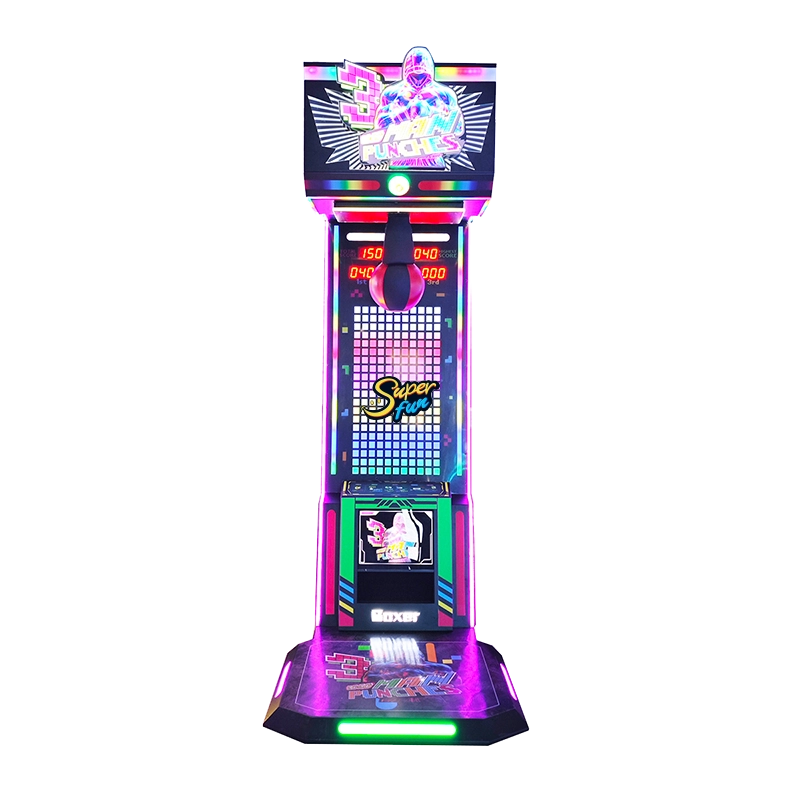
The Neon Punch Boxing Machine is a visually striking arcade boxing game designed to command attention with its full-body RGB lighting and futuristic design. The vibrant illuminated display, dynamic scoring system, and eye-catching artwork make it a centerpiece attraction in any entertainment venue.
Built for commercial use, it offers accurate punch-force detection and exciting gameplay that keeps players engaged and encourages repeat challenges. This model is ideal for arcades, malls, bars, FECs, and all venues looking to boost foot traffic and create a lively atmosphere.
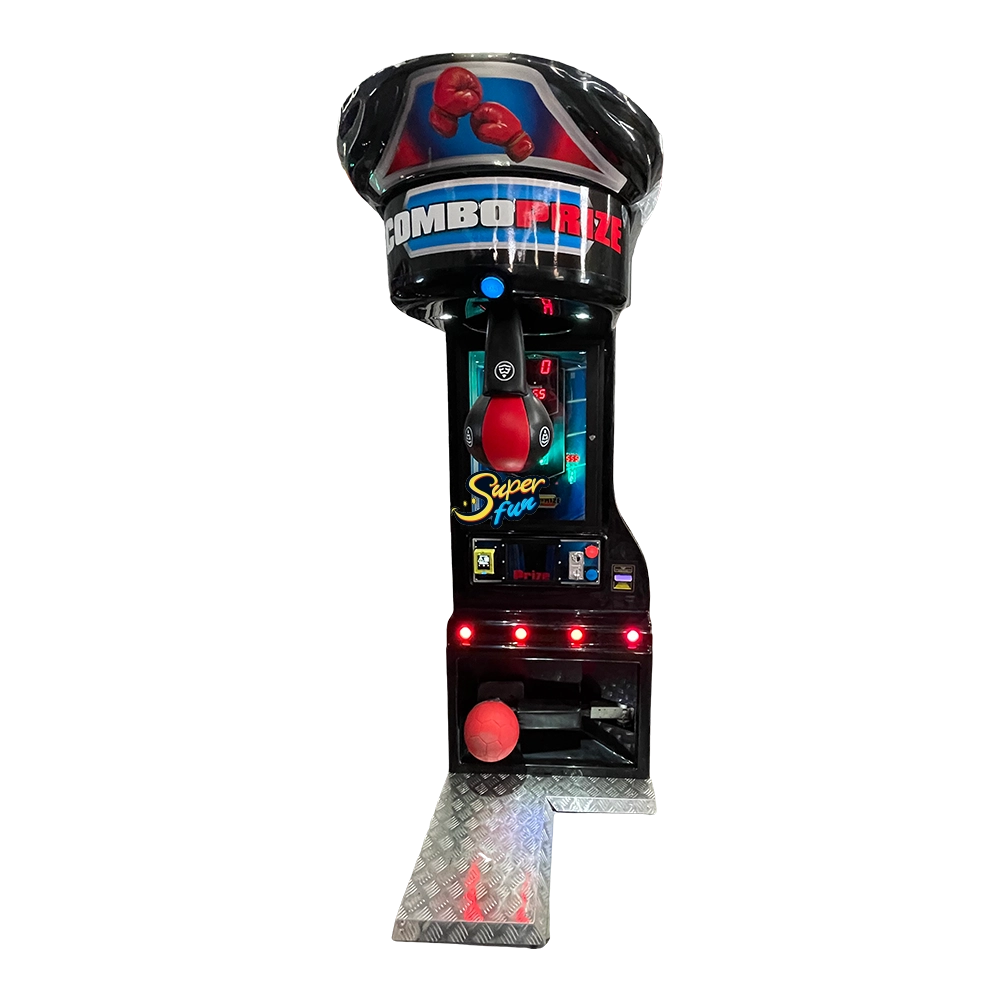
The Superfun Power Challenge Kick Boxing Machine is an interactive gift game equipment integrating boxing and kicking, blending sports challenges with physical rewards, suitable for players of all ages. With a cool and eye-catching appearance, simple and exciting gameplay, and a built-in automatic gift system, it can effectively enhance the popularity and revenue of the venue and is a high-quality choice for arcades, amusement parks, shopping malls, and other scenarios.
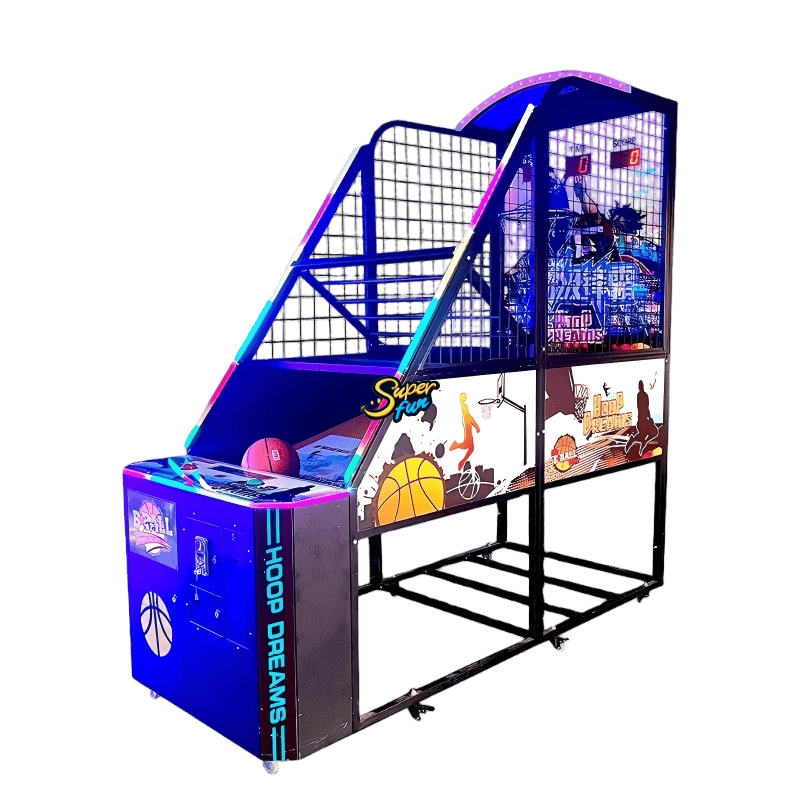
The Hoop Dreams Basketball Arcade Machine is a fast-paced and competitive shooting game designed to deliver excitement and repeat play in commercial entertainment venues. Featuring a sturdy steel structure, smooth ball return system, and bright LED lighting, this machine creates an engaging basketball experience that appeals to players of all ages.
With clear digital scoring and dynamic gameplay, it encourages friendly competition while maximizing player interaction and revenue potential. Ideal for arcades, family entertainment centers, shopping malls, and sports-themed venues.
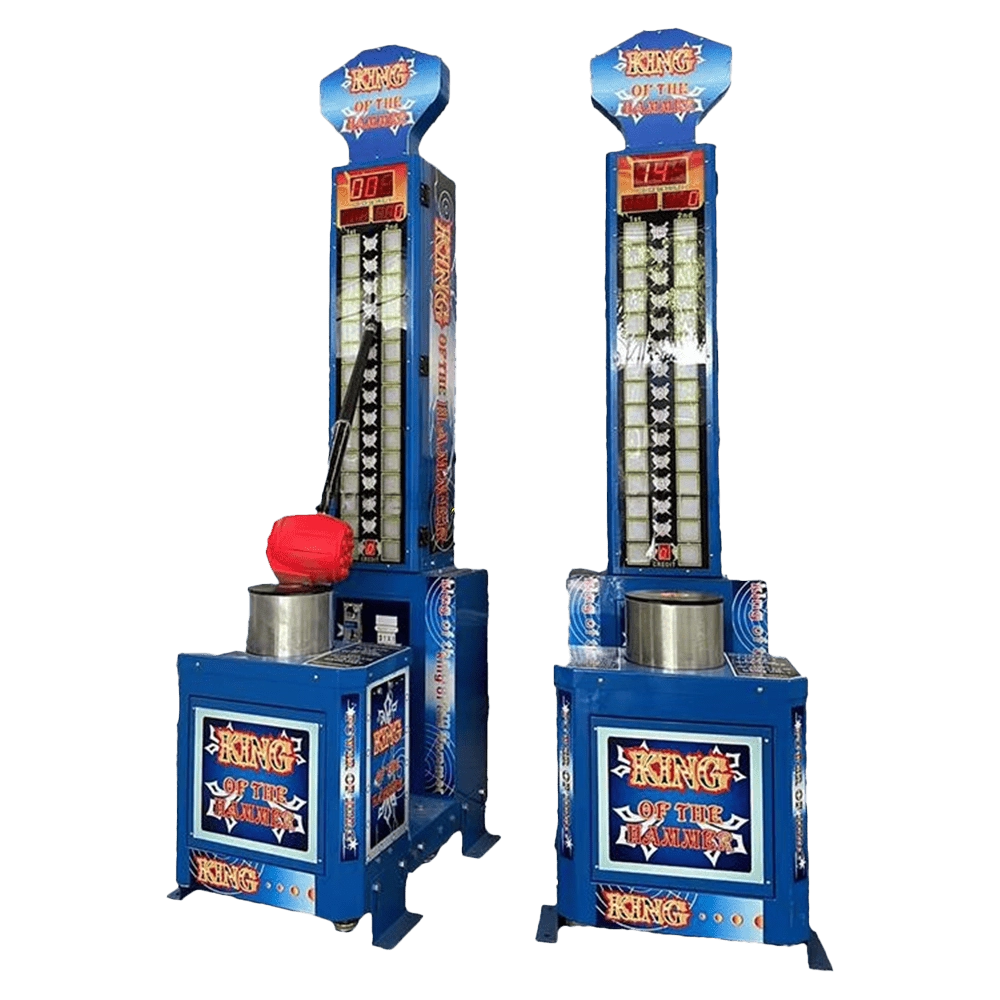
The King of the Hammer is a timeless strength-testing arcade machine known for its classic carnival-style design and exciting gameplay. With its tall scoring tower, durable hammer, and eye-catching artwork, this machine instantly becomes a crowd favorite in amusement parks, arcades, events, and carnivals. Players compete to hit the base as hard as they can and watch the indicator rise—creating thrilling moments that attract both participants and spectators. Designed for reliability and high traffic, it is an ideal revenue-generating machine for entertainment venues worldwide.
Get in touch
Request a demo or quote
If you have any questions about equipment application scenarios, customization needs, product technical support, or other queries, please feel free to contact our professional team.
At Superfun, we don't just manufacture boxing machines.
We create exciting, challenging, and high-quality sports and entertainment products for consumers.
Superfun Animation
Whatsapp: +8618022730558
Superfun Animation
superfun_camellia
Superfun Animation
Scan QR Code